


Creating an engaging website is like crafting an experience—one that’s intuitive, visually appealing, and effective across devices.
At Fallen Leaf Web Design, we aim to build sites that capture users' attention and keep them coming back.
Let’s dive into the 10 essential web design principles that guide our approach to creating high-quality, memorable websites.
| Principle | Overview |
|---|---|
| 1. Visual Hierarchy | Guides users to essential information through structured layouts, contrast, and typography. |
| 2. Consistency and Brand Identity | Creates a cohesive brand experience with uniform colours, fonts, and layouts. |
| 3. Streamlined Navigation | Simplifies access to content with intuitive menus and clear labels. |
| 4. Engaging Visual Elements | It uses optimised, high-quality images and videos to improve engagement without slowing load times. |
| 5. Effective White Space | Reduces clutter, improves readability, and makes designs more appealing. |
| 6. User-Centric Accessibility | Ensures accessibility for all users, improving inclusivity and SEO. |
| 7. Mobile-Responsive Design | Adapts layouts to various screen sizes for seamless multi-device experiences. |
| 8. Performance Optimisation | Maintains fast load times with compressed media, minified code, and caching. |
| 9. Clear Heading Structure | Organises content with descriptive headings to make navigation intuitive. |
| 10. Continuous Improvement | Refines design based on user feedback and analytics to align with evolving trends. |
1. Visual Hierarchy: Guiding the Eye, Making Things Clear
Think of visual hierarchy as the tour guide on your web page, showing users where to go next.
By using size, bold typography, and high-contrast colours, we create a clear path for visitors to follow.
For example, important elements like calls-to-action (CTAs) deserve prime real estate, larger fonts, or contrasting colours to make them pop!
This structured approach, such as using grid layouts, ensures a seamless journey through the website, making it easier for visitors to find and interact with content.
2. Consistent Brand Identity: Recognisability is Key
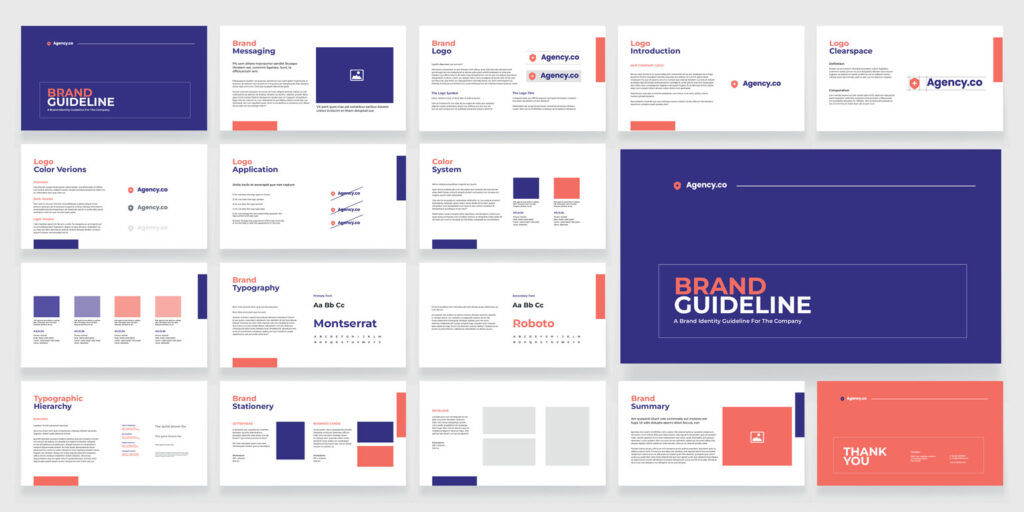
Consistency is the silent communicator of a brand’s personality.
Fallen Leaf Web Design knows that a cohesive colour scheme, fonts, and icon styles across all web pages are vital to a successful web design project.
By sticking to uniform design principles, we ensure users know it’s your brand with just a glance.
In a world of many online choices, being instantly recognisable is priceless!
3. Simple, Logical Navigation: No More Getting Lost
Navigating a site should feel natural. Our philosophy regarding site navigation is “less is more.” We use intuitive labels, clear structure, and minimal steps so users don’t feel like they’re lost in a maze.
Navigation features like breadcrumb trails, clear labels, and accessible menus at the top and bottom keep your visitors grounded.
These principles prevent confusion, especially on content-rich or e-commerce sites, leading to happier users who find what they need quickly.
4. Engaging Visual Elements: Images and Videos with Purpose
Visuals aren’t just there to make things pretty—they’re essential to engaging users.
We leverage high-quality, brand-aligned images and videos that are optimised for fast loading without losing their wow-factor.
It’s all about balance: beautiful visuals that don’t slow down the site.
Research shows that images and videos increase time on a page by up to 1.4 times, keeping visitors engaged and intrigued by your content
5. Effective Use of White Space: Let It Breathe
Whitespace (or negative space) is like a breath of fresh air for a webpage.
It lets important elements stand out without competing for attention and makes your design feel clean and uncluttered.
We use whitespace strategically to frame important information, guiding users’ focus to key messages and CTAs without overwhelming them.
Apple is a great example of a brand that maximises whitespace for a sleek, user-friendly experience.
6. User-Centric Accessibility: Inclusive Design for All
Accessibility is key to modern web design.
By following WCAG 2.1 guidelines and incorporating features like alt text for images, keyboard-friendly navigation, and adequate colour contrast, we ensure our designs are inclusive for all users.
Accessibility benefits more than just SEO—it broadens reach, ensuring that everyone can navigate and enjoy your website, regardless of their physical abilities.
7. Responsive Design: Optimised for All Devices
With most users visiting sites on mobile devices, responsive design is no longer optional; it’s a must.
Our responsive layouts adapt to different screen sizes, ensuring that content, images, and functionality remain consistent across all devices.
Google’s mobile-first indexing favours mobile-friendly designs, so our approach enhances user experience and boosts SEO performance.
8. Performance Optimisation: Speed Up or Lose Out
Users want fast, and site speed can make or break that first impression.
A one-second delay might cost you conversions, so Fallen Leaf Web Design uses strategies like image compression, code minification, and caching to keep load times quick.
Performance optimisation isn’t just for SEO—it’s essential for providing a positive user experience that keeps visitors engaged
9. Clear Headings and Structured Content: Scan-Friendly and Organised
In a world where users scan rather than read, clear, structured headings are a lifesaver.
Our web designers organise content into a logical flow using headings, subheadings, and bullet points to make information easy to digest.
This structure helps users locate the content they need faster, enhancing readability and reducing cognitive load.
10. Continuous Improvement: Iteration Based on User Feedback
Web design doesn’t end at launch.
Continuous improvement based on user feedback and analytics helps keep your site relevant and effective.
Using tools like Google Analytics, we track user interactions to identify areas for optimisation—adjusting CTAs, modifying layouts, or even redesigning elements to keep up with evolving trends and user preferences.
At Fallen Leaf Web Design, we build websites that blend beauty, usability, and performance to create an experience users love.
Following these important web design principles, we craft modern websites that leave a lasting impression and support your business goals.
FAQS: Important web design principles
1. What is the design process for creating a modern website?
Our design process is a collaborative journey that takes an idea from concept to a fully functional, well-designed website. Starting with user research and target audience analysis, we identify needs and behaviours, helping us structure the website effectively. Next, we focus on the essential design elements like colour schemes, typography, and website elements (headers, footers, navigation) to ensure consistency across the site.
2. How do you incorporate brand personality into the design?
We reflect your brand personality through consistent design elements, including colours, fonts, and icons that capture the brand’s values and appeal to the target audience. For instance, on an e-commerce site, we use a clean, easy-to-navigate layout that guides users toward products, enhancing the overall shopping experience.
3. How do you ensure the website works well on multiple devices?
Our websites are responsive, which means they adjust automatically to fit multiple devices—from desktop to mobile. This mobile design approach optimises content and images, ensuring a consistent experience no matter how users interact with the site. A well-optimised, mobile-friendly site is essential for SEO, as Google prioritises mobile-friendly websites in search rankings.
4. How do you make the website accessible to all users?
Accessibility is integral to our approach. We use descriptive alt text for images to support screen readers, ensure sufficient colour contrast, and add keyboard navigation to enhance usability. These accessibility features make the website inclusive, providing an enjoyable user experience for everyone.
5. How do you choose visual elements like images, videos, and graphics?
We select visual elements based on the brand personality and the interests of the target audience. These elements add visual appeal, but they’re also optimised to maintain loading speed. For instance, other elements like videos are compressed without losing quality to keep the site performing well, especially on mobile devices.
6. How do you ensure that users interact naturally with the website?
We design every web page with user behaviour in mind. Through user research, we understand how users prefer to navigate the site, where their focus typically lands, and how they complete actions. By arranging important elements in a clear visual hierarchy, we guide users effortlessly from one section to the next, whether they’re exploring a blog or making a purchase.
7. What design elements do you use to make the site engaging?
Engagement starts with a structured layout, a user-friendly web design, and visual appeal. We strategically implement other visual elements like icons and images to make the interface lively without clutter. Additionally, using whitespace around important elements ensures a clean, uncluttered feel.
8. What makes a website design user-friendly and enjoyable?
A website that’s easy to navigate, visually cohesive, and accessible provides an enjoyable user experience. We prioritise simplicity and intuitiveness, using structured website elements and easy-to-read headings. We aim to create a site that users find both aesthetically pleasing and functional.


